
See how your AI team works.
You lead. A Team Lead runs your AI team. Specialists do the work. Here is how it fits together.
Try an example job — choose Retail for a shop →Your team, from the top
Example: a skilled trades teamYou talk to one Team Lead. The Team Lead hands each part of a job to the right specialist and checks it before it reaches you.
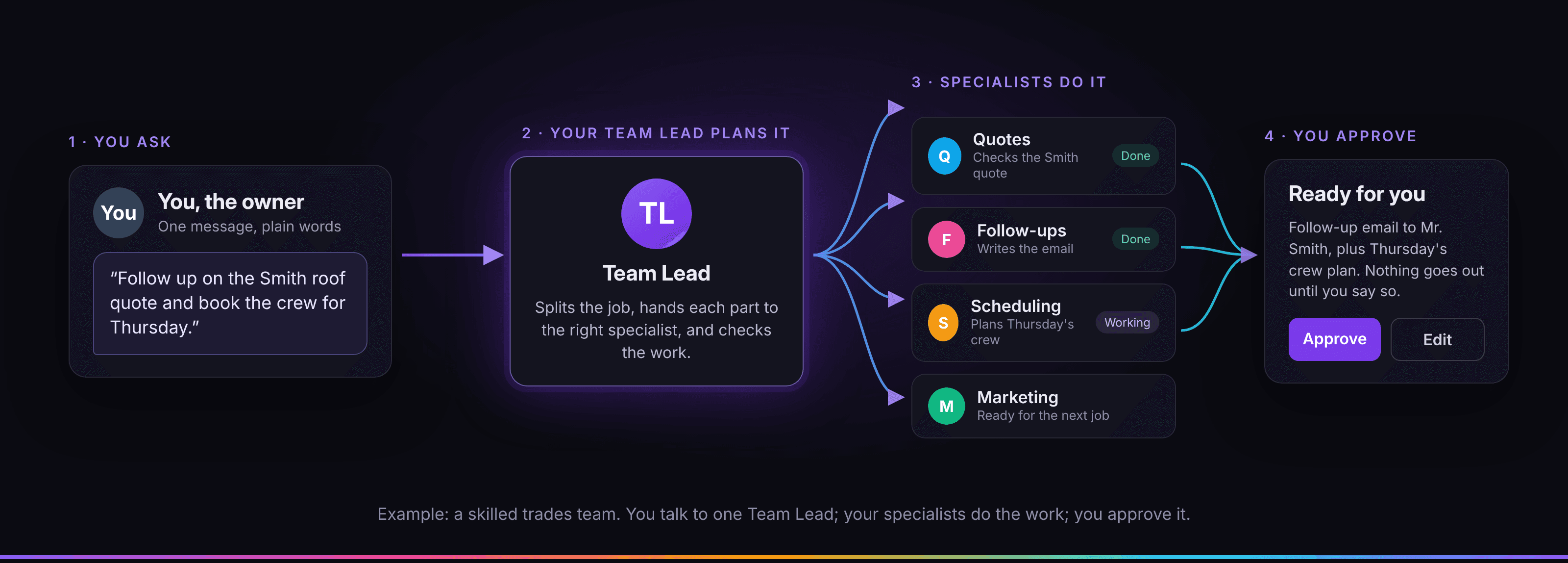
Team Lead
Plans each job, picks the specialist and checks the work before you see it.

Estimate follow-up writer

Reviews specialist

Local ads specialist

Jobs and numbers analyst

Website and social media specialist
Estimate follow-up writer
Reviews specialist
Local ads specialist
Jobs and numbers analyst
Website and social media specialist
Three steps
Pick your industry.
Choose your kind of business and answer a few guided questions.
- Choose E-commerce, Skilled trades, Finance, Retail or Something else.
- Tell us what you sell or do, who your customers are and the tone you want.
- Your team is set up for your industry, with roles and first jobs that fit it.
Your team plans and drafts.
You give a job to your Team Lead. A specialist writes the draft.
- You get a Team Lead and at least five AI specialists.
- The Team Lead picks the right specialist for the job and checks the draft.
- Each task shows who planned it, who did the work and who checked it.
You approve.
You decide how hands-on to be. Check the finished draft, then press Approve.
- Hands-on: you approve each step before your team moves on.
- Hands-off: your team keeps working and you see the result in your portal.
- You can switch between the two in your settings.
Follow one job through the portal
These are example screens of the Prism portal, filled with sample data for a skilled trades business: the team board, one task step by step, the finished draft and your approval. Press Approve to try it. Nothing is sent or saved.
Small roofing company
A fictional roofing company preparing estimate follow-ups and a weekly crew plan.
 Team LeadReports to youWorkingNowChecking the team’s workWorking on it
 Website & Social Media SpecialistSpecialist on your teamReadyNowReady for a new job.Ready for a job
 Local Ads & Video SpecialistSpecialist on your teamReadyNowReady for a new job.Ready for a job
 Reviews & Reputation Specialist1 open jobWorkingNowReview request texts for last week’s jobsWorking on it
 Quote Follow-Up Writer1 open jobNeeds youNowPrepare follow-ups for open estimatesWaiting for your OK
 Quotes & Pricing Specialist1 open jobWorkingNowQuote draft for a roof repairWorking on it
 Scheduling AssistantSpecialist on your teamReadyNowReady for a new job.Ready for a job
Swipe to see the whole team.
Waiting for you1
- Prepare follow-ups for open estimates
Done2
- Review request for the Oak Street job
- Follow-up on a gutter estimate
Jobs on this example board
Task
Prepare follow-ups for open estimates
Team Lead · Planned the job · 9:02 am
I will plan follow-ups from sample notes. No start dates promised.
Quotes & Pricing Specialist · Did their part · 9:05 am
An estimate checklist. Missing dates and decisions stay marked.
Quote Follow-Up Writer · Did their part · 9:08 am
Text and email drafts asking about the estimate. You fill in details.
Scheduling Assistant · Did their part · 9:11 am
A follow-up plan for you. Stop when the homeowner declines.
Team Lead · Checked the work · 9:14 am
Checked for missing dates and job details. You send any messages yourself.
Text message from Quote Follow-Up Writer
To: [homeowner first name]
Hi [first name], this is [your name] from [company name].
Just checking in on the roof estimate we sent on [date]. Any questions about the work or the price? Happy to walk through it on a quick call.
If you have gone another way, no problem. Just reply and I will close it out. Thanks!
Team Lead checked
- No start date is promised.
- The estimate and the price are not changed.
- Job details are placeholders for you to fill in.
Prepare follow-ups for open estimates
Text message from Quote Follow-Up Writer
After you approve, you copy the work and use it yourself. Sending it from your own apps:
Working inside the apps you already useComingHands-on or hands-off. You decide.
Watch one example job. In hands-on mode it waits for you. In hands-off mode the Team Lead checks it and files it.
Try the example below. It changes no account settings and sends nothing.
You approve each step before your team moves on.
This is the same choice you make in your portal under Settings, then Mode.
Follow up an open roofing quote
Example, sample dataHi Dana, just checking in on the roof repair quote we sent on Tuesday. Happy to answer any questions or adjust the scope. Thanks, Mike at Ridgeline Roofing
This is an example. It changes no settings and sends nothing.
Plain AI chat or a Prism team?
A chat gives you an answer to work with. Prism is designed to organize the whole job.
Follow the workflow with sample data. Jobs for your own business open after our final checks.
| What you get | Plain AI chat | Prism |
|---|---|---|
| A team with rolesA Team Lead plus at least 5 specialists. | No | Yes |
| Set up for your businessAnswer guided questions once. | No | Yes |
| Shaped to your industryRoles, first jobs and words fit your field. | No | Yes |
| You approve firstHands-on: nothing goes out without you. | No | Yes |
| Hands-off optionWorks within the permissions you set. | No | Yes |
What you can count on
- Your data stays in our systems unless you approve sending it. To do your work, your task text goes to our AI provider; the data page explains exactly what.
- You approve before anything is sent. In hands-on mode, nothing goes out until you say so.
- The rules are written down in plain pages you can read before you sign up.

Privacy policyTermsHow your data is used
Questions
Do I have to explain my business every time?
Start by choosing your industry and answering guided questions about your business. That gives Prism a business profile to work from. Include any new facts the job needs; automatic learning from your approvals is not verified yet.
Will it work while I’m asleep?
The morning handoff shown on this site is an example, not a report from your business. It does not run overnight jobs for you.
Will it sound like my business?
Your business setup includes the tone you want. Include a writing example and any facts a job needs. Do not assume Prism learns automatically from your edits.
Does it know what’s happening in my market right now?
A researcher in an example team is not a live web search. Supply current facts for your job, and check dates and sources before using market claims.
Can the AI be wrong?
Yes. AI output can be wrong. You are responsible for checking it and for anything you publish or send. Hands-on mode exists so you can look first.
What does it cost?
Starter is $29 a month for 60 tasks, Growth is $79 for 200 tasks and Pro is $179 for 450 tasks. Every plan has a usage limit. See the pricing page for the details.
Ready to meet your team?
Trials are not open yet. Create an account now; add a card when trials open. Your 7 days start then.